
BCBSIL
Blue Cross and Blue Shield of IllinoisMedical
4.61.64K Reviews
- Version
- 7.34.0
- Installs
- 500.00K
- Age Rating
- Everyone
Screenshots
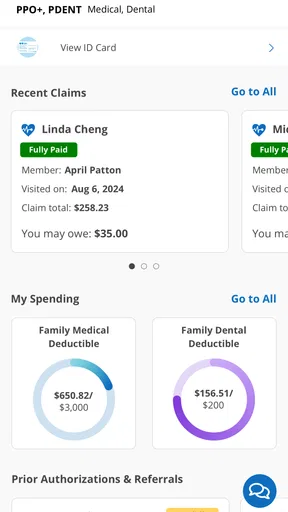
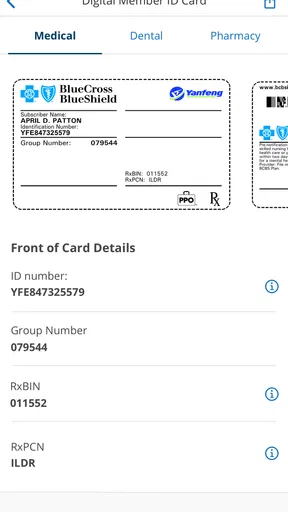
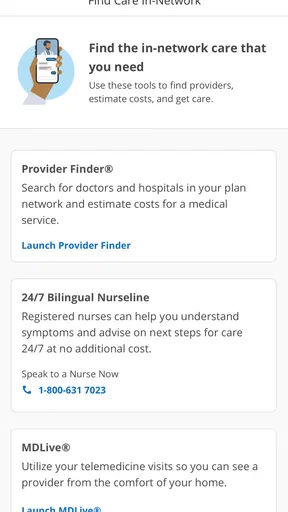
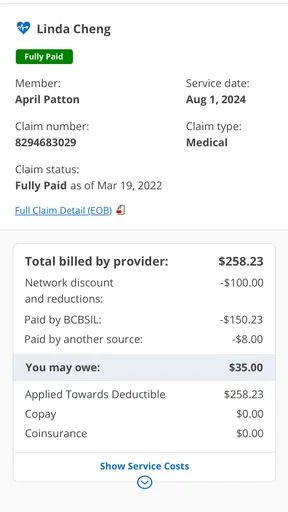
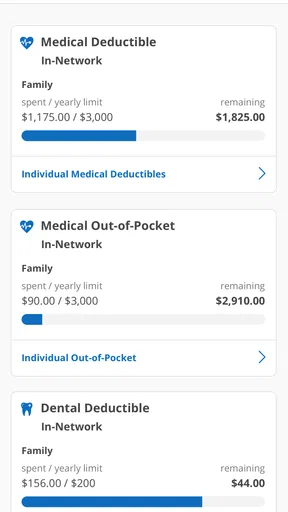
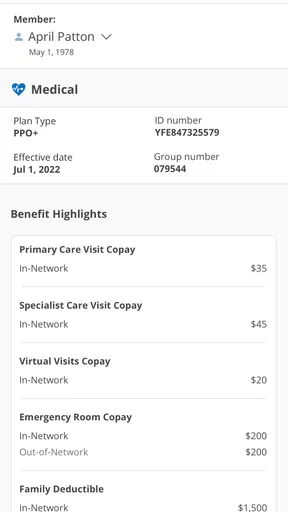
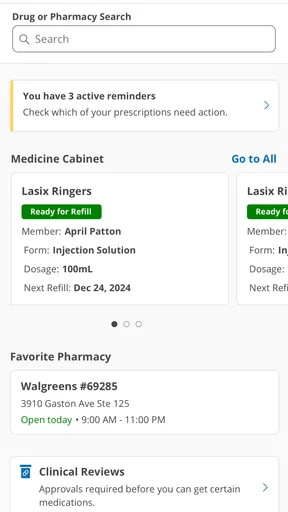
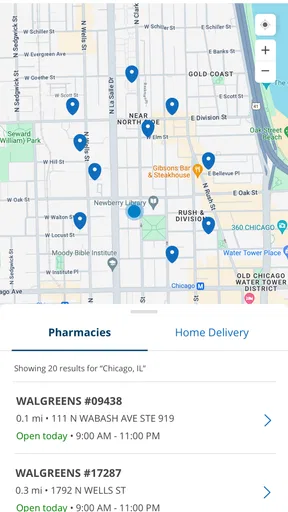
Our Review of BCBSIL
 Analysis by Appyee
Managing health coverage is rarely something I want to do for fun, but it is one of those jobs that becomes much easier when the right information is close at hand. BCBSIL is the medical app from Blue Cross and Blue Shield of Illinois, built around member information rather than general health advice or a broad wellness program. I found its value in that narrower purpose: it is meant to help BCBSIL members handle insurance-related tasks without relying on paper documents or a desktop browser every time.
The app is free to download, and its content rating is Everyone, so there is no purchase decision to make before trying it. That matters here because the real question is not whether the app is worth paying for, but whether it saves enough time and frustration to deserve a place on your phone. In my view, it can, especially if you regularly need your member information while away from home. It is less compelling for someone who rarely deals with their plan or who expects a complete personal-health platform.
What BCBSIL is useful for in everyday insurance tasks
The clearest way to understand BCBSIL is to treat it as a mobile doorway into your relationship with the insurer. The developer is Blue Cross and Blue Shield of Illinois, and the app’s focus is specifically on BCBSIL member information. That makes it different from a general medical reference app, a symptom checker, or a fitness tracker. I would open it when I need to deal with my coverage, not when I want to research a health condition.
That distinction is important before installing it. Many medical apps try to cover appointments, medication reminders, exercise, nutrition, mental health, and doctor consultations in one place. BCBSIL takes a more practical insurance-centered route. If your immediate problem is finding or using information connected to your BCBSIL membership, the app is much more relevant than a generic health app. If your goal is broader health management, you will probably need other tools alongside it.
The app has been available since December 17, 2010, which gives it a long history compared with many newer mobile services. Its current version is 7.29.0, and it requires iOS 9 or later. Those details make it approachable for people who keep an older Apple device in service, although the experience can still depend on how well an older phone handles current account screens and security requirements. I would check the device requirement before assuming an older handset will feel comfortable for everyday use.
Its public reception is reasonably strong, with a 4.4 average from around 6.7 thousand ratings and about 1.6 thousand written reviews. More than 500 thousand installs also suggest that it is not an obscure utility used by only a handful of members. I do not treat those figures as proof that every account experience is smooth, but they do indicate that the app has reached a substantial audience and has generated enough feedback to be worth considering.
The kind of problem it solves
A realistic use case is a visit to a new clinic when you are already in the waiting room and cannot remember where you put your insurance card. Instead of returning home for paperwork or searching through old email, you can use the member-focused app to look for the information associated with your coverage. That small moment is where a free app can have more practical value than its limited scope might suggest.
Another situation is handling insurance information while traveling within the area where you normally receive care. A phone is easier to carry than a folder of documents, and it is less likely to be left in a desk drawer. I would still keep important information available through a backup method, because an app should not be the only place you can access something needed during a medical visit. Convenience is helpful, but redundancy is sensible when healthcare is involved.
There is also a useful preparation habit here: open the app before you need it. Sign-in trouble, an expired session, a forgotten password, or a poor connection is much less stressful when discovered at home than at a pharmacy or reception desk. This is one of the less obvious advantages of reviewing a member app in advance. The app’s usefulness is not only about what happens after you log in; it is also about knowing whether your account is ready before an urgent errand.
How it compares with paper, a browser, and general medical apps
Compared with a physical insurance card, BCBSIL is more flexible because a phone is usually already with you. The trade-off is that a paper card does not need a battery, an operating system, or an account session. I see the app as a convenient companion to the card, not an automatic replacement for every backup option. If you are comfortable carrying the physical card and almost never need additional member information, the improvement may feel modest.
Compared with using the insurer’s website in a mobile browser, a dedicated app can feel more direct because it is designed to be opened as a member tool rather than found through a search or bookmark. That does not mean it will always be faster. A browser may be preferable if you are using a shared device, do not want another app installed, or need a larger screen for a complicated task. The better choice depends on whether you value quick mobile access or prefer keeping account activity in a browser.
Compared with a general medical app, the difference is even clearer. A wellness app may be better for tracking habits, while a telehealth service may be better for speaking with a clinician. BCBSIL’s strength is not breadth; it is relevance to BCBSIL membership. I would not install it expecting diagnosis, treatment guidance, or a complete record of every aspect of personal health. Its job is administrative and member-focused, and judging it by that standard produces a fairer result.
Where the free access delivers real value
BCBSIL is listed as free, so there is no upfront price barrier. That makes testing it straightforward: if you are a BCBSIL member with a compatible device, you can decide based on usefulness rather than subscription cost. I appreciate that distinction because an insurance companion should not create another paid layer before it helps you access information connected to coverage.
Free access does not automatically mean high value, though. The app earns its place when it replaces a repeated nuisance: searching for documents, remembering where member details are stored, or waiting until you can reach a computer. If you only open it once and then forget it exists, the financial value is still harmless because there is no purchase to recover, but the practical value will be limited. I would judge it by the number of small insurance tasks it removes from your routine.
One of my favorite ways to use a member app is as a preparation tool rather than an emergency tool. Before an appointment, I would check that I can reach the account and identify where the relevant member information appears. Before contacting a provider, I would gather the details I am likely to be asked for. This reduces the chance of mixing up information from different family members or relying on a blurry photograph of a card. The app becomes more valuable when it supports a calm workflow instead of being opened only during a stressful moment.
Families may also find the mobile format useful when more than one person’s coverage information needs attention. I would be careful to select the correct member details before sharing anything with a clinic or pharmacy. That is a small but important trade-off of having information on a compact screen: convenience can encourage quick taps, while healthcare administration rewards checking names and details carefully.
Practical habits that make the app more dependable
First, I would treat the initial setup as part of the review process. Do not wait until you are standing at a counter to find out whether your login works. Open the app on a normal day, confirm that your account is accessible, and learn the path to the information you expect to use. That single rehearsal can turn an unfamiliar interface into a quick reference later.
Second, I would keep a fallback. A physical card, a secure personal record, or another legitimate way to identify your coverage can matter if your phone is lost, out of power, or offline. This is not a criticism unique to BCBSIL; it is a sensible rule for any app that supports a time-sensitive healthcare task. The best arrangement is usually digital convenience plus a backup, rather than forcing one method to do everything.
Third, I would avoid confusing the app with medical advice. If you are worried about symptoms, need urgent help, or want to understand a treatment, an insurance member app is not the place to make a clinical decision unless it explicitly directs you to an appropriate care channel. BCBSIL can be useful for coverage-related administration, but administrative access and medical judgment are different needs.
Finally, I would update the app when practical, particularly if an older installation begins behaving inconsistently. The current version is 7.29.0, and the app supports iOS 9 or later. Keeping software current is a sensible way to reduce avoidable compatibility problems, although I would not assume an update will solve every account or network issue. Some friction can come from login credentials, connectivity, or the member account itself rather than the app alone.
Trade-offs I noticed before relying on it
The biggest limitation is its narrow audience. BCBSIL is useful because it is specific, but that specificity also means it is not a universal insurance tool. If your coverage is through another insurer, the app is not the right choice. Even within a household, its usefulness depends on whether the person using it has a BCBSIL membership and can access the relevant account information.
The second limitation is that convenience is tied to mobile conditions. A dead battery, weak connection, forgotten credentials, or an older device can turn an easy task into a frustrating one. I would not recommend deleting every paper record immediately after installing the app. Digital access is excellent for everyday convenience, but medical administration sometimes happens in places where ideal phone conditions are not available.
There is also a mental cost to using a small screen for information that deserves attention. When I am in a hurry, I can skim too quickly. That is risky when selecting a member profile or passing details to a provider. The app may make access faster, but it does not remove the need to verify what is being shown. In that sense, the app improves retrieval, not necessarily decision-making.
Another trade-off is expectation management. A polished member app can make people assume that every insurance question can be solved instantly inside it. In practice, some issues may still require direct contact with the insurer, a provider, or a pharmacy. I would use BCBSIL as the first place to look for member information, then move to the appropriate human or web support route when the task goes beyond straightforward account access.
For users who prefer desktop browsing, the app may add little. A larger screen can be more comfortable for reading, comparing documents, or managing several details at once. Likewise, someone who rarely visits doctors or pharmacies may not notice enough benefit to change their habits. The fact that it is free removes financial risk, but it does not remove the cost of clutter, notifications, storage, or learning another interface.
Who will get the most from BCBSIL
I would recommend trying it first to active BCBSIL members who regularly need insurance information away from a computer. People with recurring appointments, families coordinating care, and anyone who has misplaced a card at least once are the most likely to notice the benefit. The app is especially sensible for someone who wants a quick mobile reference and is willing to spend a few minutes preparing it before a real healthcare errand.
It can also suit people who are organized but want fewer paper-based steps. Instead of keeping every detail in a wallet or file, they can use the app as one part of a broader system. The important word is “part.” I would still keep a backup for situations where the phone is unavailable, and I would avoid assuming that the app replaces every document or every support channel.
I would be more cautious about recommending it to someone looking for a complete health companion. If your priority is symptom education, exercise tracking, medication management, or live clinical care, another category of app will likely serve you better. BCBSIL may still be useful alongside those tools, but it should not be chosen as a substitute for them.
I would also skip it if you are not a BCBSIL member or if you strongly dislike managing accounts on a phone. In that case, a browser or traditional paper approach may be less frustrating. There is no reason to install a member app merely because it is free when its central purpose does not match your needs.
My verdict on installing it
BCBSIL is worth trying when your goal is convenient access to BCBSIL member information, not broad medical care. Its free price makes the decision easy, and its long availability, current version, Everyone age rating, and substantial user base give it the profile of an established member utility rather than a speculative download. I like the practical role it can play before appointments, during pharmacy or provider visits, and whenever paper information is inconvenient.
My recommendation comes with a clear boundary: use it as a convenient access point, not as your only safety net. Prepare the account before you need it, verify the member details you are viewing, and keep a backup for low-battery or poor-connection situations. Those habits address the most realistic sources of friction and make the free app more useful in daily life.
For an active BCBSIL member, I would install it and see whether it shortens the small administrative tasks that come with using health coverage. For someone seeking wellness tools or clinical guidance, I would choose a different app and keep this one out of the comparison. Its value is focused, but that focus is exactly why it can be worthwhile for the right person.
Privacy and Permissions
See what permissions an app requests and how it handles your data.
- Location
- approximate location (network-based), precise location (GPS and network-based)
- Photos/Media/Files
- read the contents of your USB storage, modify or delete the contents of your USB storage
- Storage
- read the contents of your USB storage, modify or delete the contents of your USB storage
- Camera
- take pictures and videos
- Microphone
- record audio
- Wi-Fi connection information
- view Wi-Fi connections
- Other
- view network connections, full network access, change your audio settings, run at startup, prevent device from sleeping
Verdict
Strengths of BCBSIL
- Quick access to digital member ID cards and policy details.
- Find in-network doctors, hospitals, and urgent care locations.
- Securely view claims, deductibles, and out-of-pocket spending.
- Prescription tools help locate pharmacies and check medication coverage.
- Mobile access makes managing coverage convenient while traveling.
Limitations of BCBSIL
- Features may vary depending on your BCBSIL plan and eligibility.
- Some claims or account updates may take time to appear in the app.
- Provider search results can be difficult to filter in some areas.
- Certain services may redirect you to external websites or portals.
- Requires an active internet connection for most account features.
Similar Picks in This Category
View All
WebMD: Symptom Checker
WebMD, LLC4.1

Microphone Amplifier
DOSA Apps4.2

Anatomy Learning - 3D Anatomy
3D Medical OU4.5

Period Tracker and Calendar
SimpleInnovation4.9

GoodRx: Prescription Coupons
GoodRx4.8

CVS Health
CVS Pharmacy4.5
Frequently Asked Questions
What is the BCBSIL app used for?
The BCBSIL app is designed for Blue Cross and Blue Shield of Illinois members who want to manage their health insurance from a mobile device. After signing in, you can typically view coverage information, check claims and deductibles, access your member ID card, search for in-network doctors or facilities, review benefits, and find contact options for customer support. Available features may vary by plan.
How do I sign in to the BCBSIL app?
To use the main features, you generally need an active BCBSIL member account and your login credentials. New users may be able to register through the app by providing requested personal and insurance details, while existing members can sign in with their online account information. If you forget your password or have trouble authenticating, use the recovery tools or contact BCBSIL support.
Can I use the BCBSIL app to show my insurance card?
Yes, one of the most convenient functions is digital access to your BCBSIL member ID card. You can usually view the card when visiting a doctor, pharmacy, or hospital and may be able to save or share the information when necessary. However, keeping a physical copy available is still sensible, especially if your phone battery is low or a provider cannot access digital details.
Can I find doctors, hospitals, and pharmacies with the BCBSIL app?
The app generally includes tools for searching the BCBSIL provider network. You can look for doctors, specialists, hospitals, urgent care locations, and other healthcare facilities, often using filters such as location, specialty, or accepting new patients. Before scheduling an appointment, verify that the provider is still in-network and that the search results match your specific plan.
Is the BCBSIL app free, and is it available for every member?
Downloading the BCBSIL app is generally free, although normal mobile data charges may apply. Access to its features depends on having an eligible Blue Cross and Blue Shield of Illinois plan and a compatible Android or iOS device. Some services may require registration, identity verification, or a separate account. Your exact benefits and app functions are determined by your insurance plan.
